Series: GuardDuty Alert Triage: CloudTrail + EDR. Post 1 of 6.
In a typical AWS environment, Exfiltration:S3/AnomalousBehavior is the most common GuardDuty finding category. It fires on IAM access pattern deviations: volume spikes, new bucket access, unfamiliar source IPs, off-hours downloads. All High severity. Nearly all untriaged past the first 24 hours.
The alert tells you something happened. It does not tell you what was accessed, how much of it, or whether any of it left the account. That gap is why these alerts pile up.
This post covers the exact triage path: pulling GuardDuty context, running CloudTrail queries, classifying the source IP, and reaching a verdict. The prompt chain is designed to run against a Claude Code instance or any MCP-connected harness with AWS read access.
What Triggers This Finding
GuardDuty fires Exfiltration:S3/AnomalousBehavior when an IAM entity calls S3 APIs in a way that deviates from its established behavioral baseline. The baseline builds over a 14-day learning period per IAM entity before alerts generate.
Conditions that trigger the finding:
- Volume spike: The entity issues far more
GetObjectcalls than its baseline average in a given time window. - New bucket access: The entity accesses a bucket it has not accessed before.
- Unusual source IP or geolocation: The entity’s requests arrive from an IP or country not seen in its baseline.
- Off-hours access: The entity accesses S3 outside its normal working hours pattern.
Any one of these conditions can generate the finding. GuardDuty does not require exfiltration to succeed; it triggers on the anomalous access pattern itself.
What the CrowdStrike Alert Contains
When GuardDuty forwards this finding to CrowdStrike Falcon, the alert record includes:
| Field | Value |
|---|---|
display_name |
Exfiltration:S3/AnomalousBehavior |
description |
“An IAM entity invoked an S3 API in an unusual way.” |
severity_name |
High |
created_timestamp |
Timestamp when CrowdStrike ingested the finding |
source_products |
["Aws Guardduty"] |
falcon_host_link |
Deep link to the alert in Falcon UI |
composite_id |
Unique alert identifier |
What is not in the CrowdStrike alert: account ID, region, IAM entity ARN, bucket name, source IP, object count, or any resource-level detail. GuardDuty forwards the finding category and severity. Everything else requires a direct call to the AWS GuardDuty API or CloudTrail.
This is the core triage gap. GuardDuty detected anomalous behavior. CrowdStrike surfaced the alert. Neither tool tells you what was accessed, how much of it, or whether it left the account. CloudTrail data events answer those questions.
The Prompt Chain
The following prompt chain drives the triage. These were run against a Claude Code instance with CrowdStrike API, CloudTrail read, and AWS IAM read access. The same chain works in any harness with tool-use and multi-step reasoning: OpenClaw, Hermes, or any MCP-connected client.
Prompt 1: Pull the GuardDuty finding and identify the IAM entity
Pull the GuardDuty finding that corresponds to this CrowdStrike alert. Use the
created_timestampfrom the Falcon alert to filter findings byupdatedAt. Extract: IAM entity ARN, access key ID, bucket name, anomalous API call type, source IP, and the finding timestamp window.Then identify the IAM entity type (IAM user vs. IAM role). If a user: look up the account in Okta by email or username. If a role: determine what is assuming it (EC2 instance profile, Lambda execution role, cross-account AssumeRole). Present findings before proceeding.
Prompt 2: Run CloudTrail S3 data event queries
Using the access key ID from the GuardDuty finding, run the following:
- Pull all S3 API calls from this key in a plus/minus 2 hour window around the finding timestamp. Filter for
s3.amazonaws.comevents. List each event with timestamp, event name, bucket name, and object key where available.- Count
GetObjectcalls per bucket. Identify any bucket that has no prior CloudTrail history for this key (new bucket access pattern).- Check the source IP against AWS ip-ranges.json. Classify as: aws-service, internal-rfc1918, or external-unknown.
- Summarize total objects accessed, total buckets touched, and the source IP classification.
Prompt 3: Apply decision logic and produce a verdict
Based on the CloudTrail data and IP classification:
- If source IP is an AWS service range AND IAM entity is a known role with prior baseline access to these buckets: flag as likely false positive. Identify the specific automation or deployment change that created the new IP.
- If source IP is external AND GetObject volume is high AND at least one bucket has no prior baseline access: escalate. Disable the access key immediately. Do not wait for human review to disable the key.
- If IAM role is assumed by an external AWS account ID not recognized in trust policy context: escalate immediately. Pull all AssumeRole CloudTrail events for this role in the past 30 days.
- Output a verdict (BENIGN / INVESTIGATE / ESCALATE), the key evidence that drove the decision, and the recommended next action.
What the Agent Runs
Step 1: Pull the GuardDuty finding from AWS
The GuardDuty finding contains the resource context the CrowdStrike alert omits: IAM entity ARN, bucket name, anomalous API call, source IP, user agent, and the severity score.
# List recent findings of this type
aws guardduty list-findings \
  --detector-id <detector-id> \
  --finding-criteria '{
    "Criterion": {
      "type": {"Eq": ["Exfiltration:S3/AnomalousBehavior"]},
      "updatedAt": {"Gt": "<created_timestamp from CrowdStrike alert>"}
    }
  }'

# Retrieve full finding detail
aws guardduty get-findings \
  --detector-id <detector-id> \
  --finding-ids ["<finding-id>"]
From the finding, extract: the IAM entity ARN, the access key ID, the bucket name, the anomalous API type, the source IP, and the timestamp window.
Step 2: Identify the IAM entity
- IAM user: Check whether this user is a known employee. Look up the email in Okta or your IdP.
- IAM role: Determine what is assuming the role. Common sources: EC2 instance profiles, Lambda execution roles, cross-account role assumptions from external AWS accounts.
The entity type changes the response path. A human user accessing data from a new location is a different risk than an EC2 instance role suddenly accessing buckets in bulk.
Step 3: Pull CloudTrail S3 data events for the entity
CloudTrail data events must be enabled on the bucket for this to return results. If data events are not enabled, you are limited to what GuardDuty provides.
aws cloudtrail lookup-events \
  --lookup-attributes AttributeKey=AccessKeyId,AttributeValue=<access-key-from-finding> \
  --start-time "<finding-timestamp minus 1 hour>" \
  --end-time "<finding-timestamp plus 1 hour>" \
  --query 'Events[?EventSource==`s3.amazonaws.com`].{Time:EventTime,Action:EventName,Resource:Resources[0].ResourceName,User:Username}' \
  --output json
This returns the list of S3 API calls made by the access key in the time window, with timestamps and resource names.
Step 4: Quantify the access
Count how many objects were accessed per bucket. This converts “anomalous behavior” into a specific data volume.
aws cloudtrail lookup-events \
  --lookup-attributes AttributeKey=AccessKeyId,AttributeValue=<key> \
  --start-time "<24h window>" \
  --query 'Events[?EventName==`GetObject`]' | python3 -c "
import json, sys
events = json.load(sys.stdin)
from collections import Counter
buckets = Counter()
for e in events:
    try:
        buckets[json.loads(e['CloudTrailEvent'])['requestParameters']['bucketName']] += 1
    except:
        pass
for b, c in buckets.most_common():
    print(f'{c:6d}  {b}')
"
Twelve GetObject calls on a bucket the entity uses daily is a different signal than 4,000 GetObject calls across three buckets the entity has never touched.
Step 5: Check the source IP
Most false positives on this finding type come from new AWS infrastructure: a Lambda function deployed to a new subnet, an EC2 instance launched with a fresh IP, where GuardDuty has not yet seen that IP in the entity’s baseline. The IP check is the fastest way to separate infrastructure false positives from actual credential misuse.
curl -s "https://ip-ranges.amazonaws.com/ip-ranges.json" \
  | python3 -c "
import json, sys, ipaddress
TARGET = '<source-ip-from-finding>'
data = json.load(sys.stdin)
target = ipaddress.ip_address(TARGET)
for prefix in data['prefixes']:
    if target in ipaddress.ip_network(prefix['ip_prefix']):
        print('AWS service IP:', prefix['service'], prefix['region'])
        break
else:
    print('NOT an AWS service IP -- external or VPN')
"
If the source IP resolves to an AWS service range and the entity is a known IAM role: strong false-positive indicator.
If the source IP is external and the entity is a human IAM user: check for concurrent logins in CloudTrail ConsoleLogin events, and look for other IAM activity from the same IP in the same window.
Step 6: Check for additional indicators
# Is the access key still active?
aws iam get-access-key-last-used --access-key-id <key>

# Did the entity create presigned URLs?
# Look for GeneratePresignedUrl in CloudTrail -- these don't always appear
# depending on SDK usage, but unusual presigned URL generation is a signal.
Step 7: Triage decision
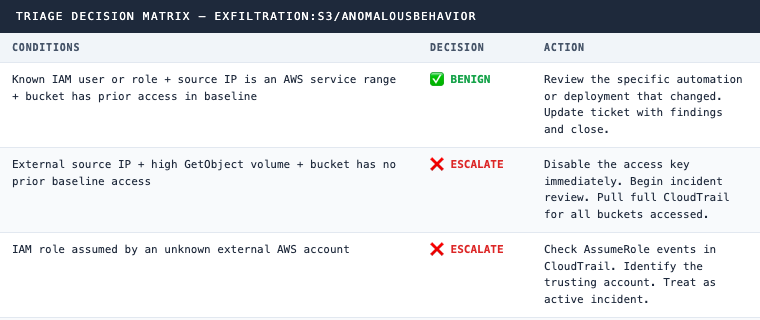
For the ESCALATE cases: disable the access key before anything else. Do not wait on the investigation to complete. You can re-enable a key if the investigation clears. You cannot un-exfiltrate data.
CQL Hunt Queries (CrowdStrike NGSIEM LogScale)
These queries cover three different triage layers: volume analysis, external IP filtering, and NGSIEM alert correlation. Each answers a distinct question.
Hunt 1: S3 GetObject volume anomaly by IAM entity
Identifies entities with high object access counts that may not have triggered GuardDuty yet.
#repo=cloudtrail
eventSource="s3.amazonaws.com" eventName="GetObject"
| groupBy([userIdentity.accessKeyId, userIdentity.arn, requestParameters.bucketName],
          function=[count(as=object_count),
                    min(eventTime, as=first_access),
                    max(eventTime, as=last_access)])
| sort(object_count, order=desc)
| object_count > 100
Hunt 2: S3 access from IPs outside AWS service ranges
Surfaces GetObject activity from non-AWS, non-RFC1918 addresses. This is the pattern most associated with actual credential theft exfiltration.
#repo=cloudtrail
eventSource="s3.amazonaws.com" eventName="GetObject"
NOT sourceIPAddress=~wildcard("*.amazonaws.com")
NOT sourceIPAddress=~wildcard("10.*")
NOT sourceIPAddress=~wildcard("172.1*")
NOT sourceIPAddress=~wildcard("192.168.*")
| groupBy([sourceIPAddress, userIdentity.arn, requestParameters.bucketName],
          function=[count(as=requests),
                    collect([requestParameters.key])])
| sort(requests, order=desc)
Hunt 3: GuardDuty Exfiltration findings in NGSIEM
Confirms that CrowdStrike-forwarded GuardDuty findings are landing in NGSIEM and shows alert volume over time.
#repo=search-all
/Exfiltration:S3\/AnomalousBehavior/
| groupBy([display_name], function=[count(as=alert_count), min(@timestamp, as=first_seen)])
| sort(alert_count, order=desc)
Why CloudTrail Data Events Are Non-Negotiable
GuardDuty confirms that an IAM entity accessed S3 in an unusual way. It does not tell you what objects were accessed, how many were downloaded, or what the total data volume was. That information exists only in CloudTrail data events.
If CloudTrail data events are not enabled on your S3 buckets, you cannot confirm or rule out exfiltration from a GuardDuty finding. You are stuck with “anomalous behavior detected” and no path to a verdict. Enabling data events on high-value buckets is a prerequisite for this triage path to work, not an enhancement.
The workflow above gets you to a verdict in under 15 minutes for most alerts. The manual version of the same investigation takes two hours, if you know exactly where to look. Most alerts in a typical environment age out before anyone gets there.
Ready to automate GuardDuty triage across your AWS environment? See how 543HQ builds agentic security workflows.
Need a hand with this at your company?
543HQ helps startups and growing companies build security programs that actually work. Start with a free 30-minute call.
Book a Free Call