Series: GuardDuty Alert Triage with CloudTrail + EDR. Post 3 of 6.
Detection Context
GuardDuty generates two distinct finding types for command-and-control activity on EC2 infrastructure. The finding type that fires tells you how much process-level context you start with, and that determines how much additional work falls to your EDR.
MITRE ATT&CK: T1071 (Application Layer Protocol), T1095 (Non-Application Layer Protocol), TA0011 (Command and Control).
Finding types covered in this post:
Backdoor:EC2/C&CActivity.B: network-layer detection via VPC Flow LogsBackdoor:Runtime/C&CActivity.B: process-level detection via GuardDuty Runtime Monitoring agent
Both findings fire when an EC2 instance communicates with an IP or domain from GuardDuty’s threat intelligence feed. The Runtime variant adds the specific process responsible for the connection.
What Triggers These Findings
Backdoor:EC2/C&CActivity.B
GuardDuty compares VPC Flow Log data against its threat intelligence feed: known C2 server IPs, TOR exit nodes, cryptocurrency mining pool IPs, and botnet infrastructure. When an EC2 instance establishes an outbound connection to an IP on that feed, this finding fires.
What it gives you: the EC2 instance ID, the destination IP, the destination port, the protocol, and the connection count over the detection window. What it does not give you: which process on the instance made the connection.
Backdoor:Runtime/C&CActivity.B
GuardDuty Runtime Monitoring deploys an agent inside EC2 instances and container workloads. That agent observes process-level behavior and network connections at the OS layer. When a process inside the instance makes a connection to a C2 IP from the threat intel feed, the Runtime finding fires.
What it gives you: everything in the EC2 finding, plus the specific process name and path that made the connection. That process name is the most operationally useful field in the entire finding. It immediately tells you whether the connection came from a known application process or something that should not be running on the host.
Triage priority rule: if both finding types exist for the same host, start with the Runtime finding. The process name narrows your investigation before you open a single RTR session. If only the EC2 finding exists, Steps 2 and 3 in this playbook recover the process-level context that the finding does not provide.
Scenario
For illustration: consider a cluster of backdoor C2 alerts landing across two consecutive days, all High severity, all untriaged. In the same 48-hour window, the same EC2 instance generates a Trojan:Runtime/DNS finding and two generic runtime findings that EDR subsequently closes as false positives.
Five GuardDuty alerts in 48 hours from the same cluster of hosts is not noise. Clustered findings across multiple categories (C2, Trojan DNS, and generic runtime) from the same instance in a short window carry more weight than any individual alert. A single C2 finding with no other signals might be a false positive from a recently re-categorized IP. A C2 cluster plus Trojan DNS in 48 hours warrants containment investigation, not a wait-and-see.
When working the triage queue, pull the full finding list for the same instance ID across the entire cluster window before making a verdict decision on any individual alert.
The Prompt Chain
The following prompt chain drives the triage. These were run against a Claude Code instance with CrowdStrike API, CloudTrail read, and VPC Flow Log access. The same chain works in any harness with tool-use and multi-step reasoning: OpenClaw, Hermes, or any MCP-connected client.
Prompt 1: Pull and classify the finding
Pull the GuardDuty finding using the AWS CLI. Extract: finding type (EC2 vs Runtime), EC2 instance ID, destination IP, destination port, protocol, and (for Runtime findings) the process name and executable path. Note the threat list name from additionalInfo. Check whether both finding types exist for the same instance; if so, flag the Runtime finding as primary for this triage.
Prompt 2: Correlate EDR and network state
Using the EC2 instance ID from the finding, locate the matching Falcon device record. Pull all Falcon alerts on that device from a 24-hour window around the GuardDuty finding timestamp. Look specifically for SuspiciousRMMUsage, LinWebshell, DllHijackingPersistence, and any network behavioral detection names.
Then open an RTR session and run netstat to capture current network connections. Check whether the destination IP from the GuardDuty finding is in an ESTABLISHED state. If it is, note it.
Pull VPC Flow Logs for the destination IP across the same time window. Extract the total connection count and total bytes to that IP.
Prompt 3: Evaluate the destination IP and apply verdict logic
Query the destination IP against external threat intel (AbuseIPDB). Cross-reference with the GuardDuty threat list name from the finding.
Apply the following decision logic:
- Process is unknown or not a known application binary + active ESTABLISHED connection to destination IP + high AbuseIPDB score: CONFIRM COMPROMISE, contain and investigate persistence
- Process is a known application + destination IP is newly categorized (low AbuseIPDB score, recent GuardDuty list addition): INVESTIGATE further, do not auto-contain
- No active connection + low connection volume in Flow Logs + no corroborating Falcon detections: LIKELY FP, document and close with suppression candidate note
Return a structured verdict with the process name, destination IP, connection volume from Flow Logs, Falcon alert count, and AbuseIPDB confidence score.
What the Agent Runs
Step 1: Pull the GuardDuty finding for full context
aws guardduty get-findings \
  --detector-id <detector-id> \
  --finding-ids ["<finding-id>"]
Extract from the finding JSON:
resource.instanceDetails.instanceId: the EC2 instanceresource.instanceDetails.tags: environment, owner, application tagsservice.action.networkConnectionAction.remoteIpDetails.ipAddressV4: destination IPservice.action.networkConnectionAction.remoteIpDetails.organization.asn: destination ASN and orgservice.action.networkConnectionAction.remotePortDetails.port: destination portservice.action.networkConnectionAction.protocol: TCP or UDPservice.additionalInfo.threatListName: which GuardDuty threat intel list matched- For Runtime findings:
service.runtimeDetails.process.nameandservice.runtimeDetails.process.executablePath
The threatListName field tells you how GuardDuty categorized the destination: C2, TOR exit node, cryptocurrency mining pool, or botnet infrastructure. This is the first signal for assessing whether the finding is high-confidence or borderline.
Step 2: Correlate with Falcon EDR on the same host
Locate the Falcon device record using the instance ID:
# Find the Falcon device record for this EC2 instance
GET /devices/queries/devices/v1
filter: "instance_id:'<ec2-instance-id>'"

# Retrieve full device details
GET /devices/entities/devices/v2
ids: ["<device-id>"]

# Pull all Falcon alerts on this device in the 24-hour window
GET /alerts/queries/alerts/v2
filter: "device_id:'<device-id>'+created_timestamp:>='<24h before finding>'"
If Falcon has alerts on this device from the same time window, review them before proceeding. Falcon detections at the process level may already describe what GuardDuty detected at the network layer. Look specifically for: SuspiciousRMMUsage, LinWebshell, DllHijackingPersistence, and any network-related behavioral detection names.
Step 3: Check active network connections on the host
Open a Real Time Response session and check current network state:
# Open RTR session
POST /real-time-response/entities/sessions/v1
body: {"device_id": "<device-id>"}

# Run netstat via RTR
POST /real-time-response/entities/command/v1
body: {
  "session_id": "<session-id>",
  "base_command": "netstat",
  "command_string": "netstat -an"
}
Active ESTABLISHED connections to the C2 IP at triage time confirm the connection is ongoing. No connection found does not rule out compromise. C2 beacons often use periodic short-duration connections, and absence of an active connection shifts the investigation to Step 4 (Flow Log volume) rather than closing the finding.
Step 4: Check VPC Flow Logs for the connection pattern
VPC Flow Logs provide connection frequency and data volume, which GuardDuty does not include in the finding. A single connection that matched a threat intel IP looks different from 200 connections with megabytes of outbound data.
aws logs filter-log-events \
  --log-group-name /vpc/flow-logs/<vpc-id> \
  --filter-pattern "[version, account, eni, source, destination=<c2-ip>, srcport, destport, protocol, packets, bytes, start, end, action, status]" \
  --start-time <epoch-milliseconds of finding minus 3600000>
Look at the bytes field and the number of matching flow records. High bytes or high connection frequency increases confidence that this is active C2 communication rather than a one-time connection that happened to match the threat intel feed.
Step 5: Evaluate the destination IP with threat intel
The service.additionalInfo.threatListName from Step 1 tells you GuardDuty’s categorization. If you have external threat intel tooling, query the destination IP independently:
curl "https://api.abuseipdb.com/api/v2/check?ipAddress=<c2-ip>&maxAgeInDays=90" \
  -H "Key: <ABUSEIPDB_KEY>"
A high AbuseIPDB confidence score for the destination IP, combined with GuardDuty’s threat intel match, increases confidence that the finding is accurate. A low confidence score against a recently recategorized IP is a reason to investigate further before containing.
Step 6: Check for persistence mechanisms
If the connection is confirmed active or the process is confirmed unusual, look for persistence before isolating. Containing without identifying persistence mechanisms stops the current session but may not address the full foothold.
# Pull Falcon detection history for the past 7 days
GET /alerts/queries/alerts/v2
filter: "device_id:'<device-id>'+created_timestamp:>='<7d ago>'"
Via RTR, check:
- Cron jobs on Linux hosts:
crontab -l,/etc/cron* - Systemd services added outside normal package management:
systemctl list-units --type=service - Unusual SUID binaries or setuid files modified recently
Step 7: Contain if confirmed
If an active C2 connection is confirmed, the process is not a known application binary, and there are no benign explanations:
POST /devices/entities/devices-actions/v2
action_name: contain
body: {"ids": ["<device-id>"]}
Falcon network containment isolates the host from all traffic except the Falcon sensor connection. This stops active C2 communication while preserving host state for forensic analysis. Containment is not the end of the investigation. It is the start of the persistence and blast-radius phase.
Finding Type Comparison
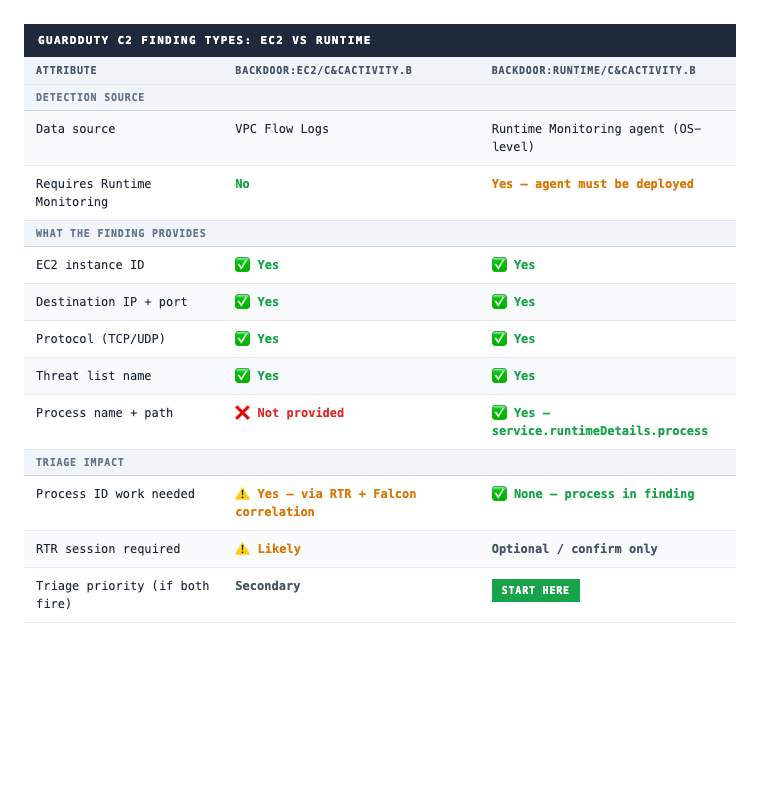
The core difference: Backdoor:EC2/C&CActivity.B is generated from VPC Flow Logs and tells you an instance communicated with a C2 IP. You recover the process context through RTR and Falcon alert correlation. Backdoor:Runtime/C&CActivity.B is generated from the Runtime Monitoring agent and gives you the exact process before you open a single RTR session.
When only the EC2 finding exists, Steps 2 and 3 of this playbook (Falcon alert correlation and RTR netstat) are where you do the process identification work that the Runtime finding provides for free.
CQL Hunt Queries
These queries run in CrowdStrike NGSIEM / LogScale. Hunt 2 requires Falcon Insight telemetry to be flowing into NGSIEM; confirm that pipeline is active before relying on it for triage.
Hunt 1: Outbound connections to non-RFC1918 IPs from VPC (high volume or high bytes)
#repo=search-all
action="ACCEPT"
direction="egress"
NOT dstaddr=~wildcard("10.*")
NOT dstaddr=~wildcard("172.1*")
NOT dstaddr=~wildcard("192.168.*")
NOT dstaddr=~wildcard("*.amazonaws.com")
| groupBy([srcaddr, dstaddr, dstport, protocol],
          function=[count(as=connection_count), sum(bytes, as=total_bytes)])
| sort(total_bytes, order=desc)
| connection_count > 5
Sort by total_bytes to surface connections moving the most data, then by connection_count to surface beaconing patterns.
Hunt 2: Falcon Insight network connections from processes on EC2 hosts to external IPs
#repo=search-all
event.simpleName=NetworkConnectIP4
ComputerName=~wildcard("*.ec2.internal")
NOT RemoteAddressIP4=~wildcard("10.*")
NOT RemoteAddressIP4=~wildcard("172.1*")
NOT RemoteAddressIP4=~wildcard("192.168.*")
| groupBy([ComputerName, ImageFileName, RemoteAddressIP4, RemotePort],
          function=[count(as=connection_count)])
| sort(connection_count, order=desc)
ImageFileName is the process binary path. Unusual binary paths making repeated external connections are the primary signal. This query provides the process-level context that Backdoor:EC2/C&CActivity.B does not include in the finding.
Hunt 3: Connections to known high-risk ports from EC2 hosts
#repo=search-all
event.simpleName=NetworkConnectIP4
ComputerName=~wildcard("*.ec2.internal")
RemotePort in [4444, 1337, 6666, 8443, 9001, 9030, 4545, 12345]
| select([ComputerName, ImageFileName, RemoteAddressIP4, RemotePort,
          LocalAddressIP4, timestamp])
| sort(timestamp, order=desc)
These ports are commonly associated with Metasploit listeners, Cobalt Strike beacons, and TOR proxy configurations. EC2 hosts connecting to these ports from non-application processes warrant immediate review.
Correlated Alerts: Why Individual Findings Mislead
The scenario at the top of this post described a cluster of C2 findings alongside a Trojan:Runtime/DNS finding in 48 hours from the same host. That context changes the triage calculus.
Triaging individual alerts in isolation produces different verdicts than triaging the same alerts as a cluster. A single C2 finding with no Falcon detections and low Flow Log volume is a reasonable candidate for false positive review. The same C2 finding, when it appears alongside Trojan DNS activity and runtime anomalies from the same instance, is not.
Pull the full finding list for the same instance ID across the cluster window before making a verdict on any individual alert. The verdict on one alert informs how aggressively you investigate the others.
Closing
The process name in a Runtime finding does not tell you whether the compromise is active or how far it has spread. It tells you where to look next. The investigation starts there.
Looking to automate EDR and cloud alert triage? See how 543HQ designs agentic security workflows.
Need a hand with this at your company?
543HQ helps startups and growing companies build security programs that actually work. Start with a free 30-minute call.
Book a Free Call