1. Use Case Context
A GRC platform with 20-plus active integrations is most commonly treated as a compliance evidence collector. You connect Workday, GitHub, CrowdStrike, Datadog, and your cloud accounts during audit prep, let the platform collect evidence on schedule, and move on. Between assessments, the integrations sit idle.
That framing leaves the actual value on the table.
Every integration is a queryable API endpoint. Every HR event in Workday is a trigger. The access data, activity logs, and configuration state that your GRC platform collects for compliance purposes are also real-time detection inputs. The gap is not the data. It is the absence of a layer that continuously correlates across platforms.
That layer is the agent.
Three structural patterns generate most of the detectable gaps in connected environments:
HR event propagation failures. Workday processes a termination. Your GRC platform updates the person’s status to FORMER. Your IdP deprovisions the account. In theory, every SSO-connected SaaS platform follows. In practice, platforms with SCIM mapping errors, local credential bypass paths, or delayed sync schedules stay active. The gap is invisible in any single platform. It only surfaces when you query each one against the HR record.
Ownership drift over time. Employees leave. The infrastructure they owned stays: GitHub Actions they authored, Datadog monitors they created, AWS resources tagged to their email. None of these trigger an alert. None produce a compliance finding. They accumulate silently until an incident surfaces the gap: a critical deploy pipeline with no active owner, a P1 monitor with broken routing, a cloud resource with no one applying patches.
Pre-departure data access. The highest-risk window for data exfiltration is the two weeks before a known termination date, when the employee has full legitimate access but may have motivation to pull data. Standard DLP does not flag this because the access is authorized. The signal only appears when you correlate termination dates against download activity in connected systems.
The workflows below target the first two patterns. Each is a discrete agent run, either HR-event-triggered or scheduled, using APIs your GRC platform already has access to.
2. Scenario
A weekly agent run surfaces two findings that arrived in the same 72-hour window.
A senior engineer who departed 11 days ago still owns two GitHub Actions workflows that run on a nightly cron schedule and deploy to a staging environment. The engineer’s org membership was removed correctly. The workflow YAML files still list them as the commit author and the deploy secrets are scoped to their former identity. The workflows are still running.
The same sweep checks Datadog and finds four P1 monitors (all owned by a different former employee) where the notification routing points to a Slack handle that no longer resolves. The monitors are active. When they fire, the alerts go nowhere.
Both findings were in the data before the agent ran. The issue is not that detection was hard. No single platform surfaces the cross-system correlation. The agent is the correlation step.
3. Prompt Chain
Prompt 1: Build the population
Query your GRC platform (e.g., Vanta /people) for all records where status = FORMER
and terminatedAt is within the last 60 days.

For each person, return: name, email, terminatedAt, and the list of connected
integrations active at time of termination.

Also query Workday for anyone with a confirmed termination date within the next 14 days
(pre-departure risk window). For this group, return: name, email,
scheduled_termination_date, department, and current access profile.
Prompt 2: Run parallel checks
For each FORMER person, run ALL of the following checks concurrently.
Do not wait for one to complete before starting the next.

1. IdP check: confirm account status in your IdP (Okta, Entra ID, or equivalent).
   Pull active app assignments. Query post-termination authentication events.

2. GitHub ownership check: search org repos for workflow YAML files where the last
   commit author matches the person's email. Check for active PATs in the audit log.
   Look for any scheduled triggers still active on those workflows.

3. Datadog access check: confirm account status. Pull any API keys issued to the
   person's user ID. Query audit logs for API activity after terminatedAt.

4. Infrastructure ownership check: scan AWS resources (EC2, Lambda, RDS, S3) across
   all accounts for owner, creator, and engineer tags matching the person's email.

For each check: return account_active (bool), post_term_activity (bool),
activity_summary, severity (CRITICAL/HIGH/MEDIUM/CLEAN).
If a check fails or times out, return status=ERROR. Do not skip silently.

Also run the following on a weekly cadence, regardless of any specific person:

5. Datadog monitor ownership: for every monitor and dashboard, check the creator
   email against Workday status. Flag items owned by FORMER employees, sorted by
   monitor priority (P1 first).

6. GitHub Actions scheduled workflow audit: find all org workflows with a schedule:
   trigger where the last commit author resolves to FORMER in Workday.
Prompt 3: Route output
For each CRITICAL or HIGH finding:
- Post a structured finding report to the security alert channel.
- Open a Jira ticket with: person or resource, affected platforms, root cause,
  and recommended action.
- For accounts still active: include the exact API call needed to deprovision.

For MEDIUM findings:
- Open a Jira task with recommended action. No immediate alert required.

For CLEAN results:
- Write a summary record to the offboarding audit log.

For all results:
Produce a consolidated summary table: person or resource | terminatedAt |
platforms checked | risk level | action taken.

Deduplication rule: a former employee appearing across multiple checks gets one
consolidated finding ticket, not one per platform. Open separate remediation
tasks per platform action required.
4. Agent Workflow
Workflow A: GitHub Actions Owned by Terminated Employees
Step 1: Find workflow files authored by the former employee
GitHub Actions files live in .github/workflows/. Use the search API to scope to repos with recent workflow changes, then pull the latest commit per file:
GET https://api.github.com/search/code?q=org:{org}+path:.github/workflows+extension:yml
Authorization: Bearer {token}
For each result, check the last commit’s author:
GET https://api.github.com/repos/{owner}/{repo}/commits
  ?path=.github/workflows/{filename}&per_page=1
Authorization: Bearer {token}
Compare commit.author.email against the terminated employee’s email.
Step 2: Check for active scheduled triggers
Parse the workflow YAML for any schedule: block:
on:
  schedule:
    - cron: '0 2 * * *'
Any workflow with a schedule: trigger runs independently of whether its author has active credentials. It will continue running until the workflow file is modified or disabled. Org membership removal does not stop it.
Step 3: Check for active PATs in the audit log
GET https://api.github.com/enterprises/{enterprise}/audit-log
  ?phrase=actor:{username}+action:personal_access_token.create
Authorization: Bearer {enterprise_admin_token}
Filter for tokens created before terminatedAt with no subsequent revoke event. PATs do not expire when org membership is removed.
Step 4: Decision logic
| Condition | Severity | Action |
|---|---|---|
| Workflow authored by FORMER, no scheduled trigger | LOW | Flag for ownership transfer; no urgency |
| Workflow with scheduled trigger, author is FORMER | HIGH | Disable workflow; open Jira ticket for CODEOWNERS update |
| Scheduled workflow + active PAT from former identity | CRITICAL | Disable immediately; revoke PAT via Admin API; audit recent run logs |
| Deploy workflow with write access to production environment | CRITICAL | Suspend workflow; rotate any secrets the workflow could access |
Workflow B: Datadog Access Surviving Deprovisioning
The structural cause is the same as most SaaS offboarding failures: SCIM sync confirms account deactivation, but API keys issued to that user live outside the IdP session. They persist until explicitly revoked.
Step 1: Check account status
GET https://api.datadoghq.com/api/v1/user/{email}
DD-API-KEY: {api_key}
DD-APPLICATION-KEY: {app_key}
Check disabled (boolean). A deprovisioned user should have disabled: true.
Step 2: Pull API keys issued to the user
GET https://api.datadoghq.com/api/v2/api_keys?filter[user_id]={user_id}
DD-API-KEY: {api_key}
DD-APPLICATION-KEY: {app_key}
Datadog API keys do not deactivate when the user account is disabled. A former employee’s key can still query metrics, read logs, or trigger monitors until explicitly revoked, even if the account shows disabled: true.
Step 3: Check for post-termination API activity
GET https://api.datadoghq.com/api/v2/audit/events
  ?filter[query][email protected]:{email}
  &filter[from]={terminatedAt}
  &filter[to]={now}
Authorization: Bearer {dd_app_key}
Any authenticated API activity after terminatedAt is an immediate escalation regardless of whether the account is disabled. It indicates an active token is being used.
Step 4: Decision logic
| Condition | Severity | Action |
|---|---|---|
| Account disabled, no API keys found | CLEAN | Document |
| Account disabled, orphaned API keys present | HIGH | Revoke via DELETE /api/v2/api_keys/{key_id} |
| Account active post-deprovisioning | MEDIUM | Disable via admin console; check for API keys |
| Active API key + post-term activity detected | CRITICAL | Revoke keys immediately; investigate activity scope; escalate |
Workflow C: Orphaned Infrastructure
Two surfaces, same underlying check: for every resource, resolve the owner’s email against current Workday status.
Datadog monitors and dashboards
Pull all monitors and check creator.email against Workday:
GET https://api.datadoghq.com/api/v1/monitor?with_downtimes=false&page_size=100
DD-API-KEY: {api_key}
DD-APPLICATION-KEY: {app_key}
For dashboards, check author_handle:
GET https://api.datadoghq.com/api/v1/dashboardFor any monitor owned by a FORMER employee, inspect the message field. Notification routing embedded in the monitor body (Slack handles, email addresses) may reference the former employee directly and fail silently when the monitor fires.
AWS resources
Scan across accounts for resource tags matching the former employee’s email:
aws ec2 describe-instances \
  --filters "Name=tag-key,Values=owner,creator,engineer" \
  --query 'Reservations[].Instances[].[InstanceId,Tags,State.Name,Placement.AvailabilityZone]'

aws lambda list-functions --query 'Functions[].[FunctionName,Tags]'
aws rds describe-db-instances --query 'DBInstances[].[DBInstanceIdentifier,TagList,DBInstanceStatus]'
A single cross-account IAM role with tag read permissions is significantly easier to operate than per-account credentials. Set it up once and reference it from the agent’s execution environment.
Decision logic (combined)
| Condition | Severity | Action |
|---|---|---|
| Monitor owned by FORMER, muted or disabled | LOW | Reassign ownership; no urgency |
| Monitor owned by FORMER, active, P4/P5 | MEDIUM | Open Jira task for ownership reassignment |
| Monitor owned by FORMER, active, P1/P2 | HIGH | Immediate reassignment; verify and fix notification routing |
| All monitors for a given service owned by FORMER employees | HIGH | Escalate to engineering lead; service has no monitoring owner |
| AWS resource tagged to FORMER, stopped/inactive | LOW | Update owner tag; schedule decommission review |
| AWS resource tagged to FORMER, running | MEDIUM | Open Jira task for ownership reassignment |
| Running resource in production account, no active owner | HIGH | Escalate to engineering lead |
| Running resource in CDE-scoped account, no active owner | CRITICAL | Immediate escalation; PCI scope gap |
Workflow D: IdP Deprovisioning Verification
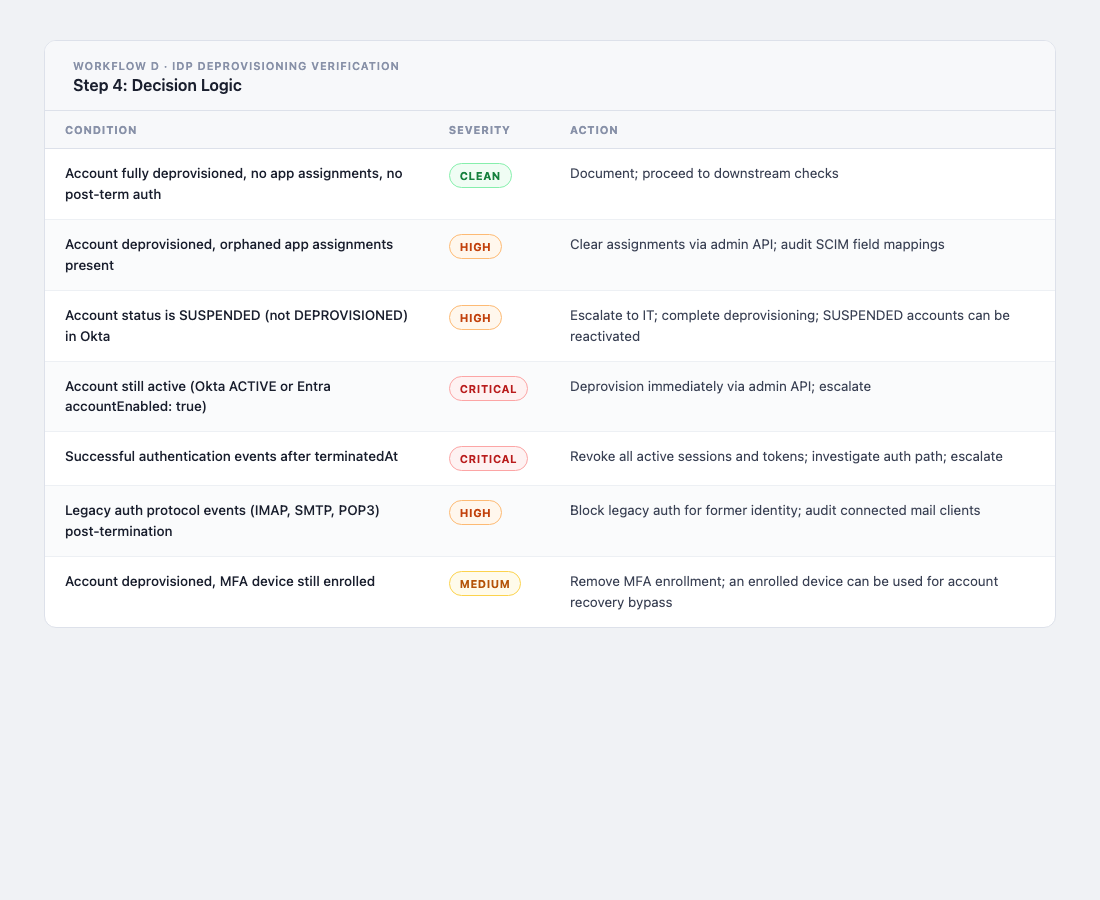
The IdP is the control plane for every other check. When Workflow B surfaces Datadog API keys that survived deprovisioning, or Workflow C finds orphaned infrastructure, the upstream question is always the same: did deprovisioning actually succeed at the IdP level, or did it fail silently there too? This workflow checks the root before assuming the downstream failures are the whole story.
Step 1: Confirm account status
For Okta:
GET https://{org}.okta.com/api/v1/users/{email}
Authorization: SSWS {api_token}
Check status. A correctly deprovisioned account should show DEPROVISIONED. Any other value (ACTIVE, SUSPENDED, LOCKED_OUT, RECOVERY) is a finding. SUSPENDED is not deprovisioned; the account can be reactivated and authenticated against.
For Entra ID:
GET https://graph.microsoft.com/v1.0/users/{userPrincipalName}
Authorization: Bearer {access_token}
Check accountEnabled. Should be false. Also pull signInActivity.lastSignInDateTime directly from this response: a single field that tells you whether the account has been used recently without a separate log query.
Step 2: Pull active app assignments
For Okta:
GET https://{org}.okta.com/api/v1/users/{userId}/appLinks
Authorization: SSWS {api_token}
This returns all applications the user is currently assigned to. A correctly deprovisioned account should return an empty list. Any active app assignment for a DEPROVISIONED user indicates a SCIM provisioning gap. The IdP removed the account but did not push the deprovisioning event downstream to the SaaS app.
For Entra ID:
GET https://graph.microsoft.com/v1.0/users/{userId}/appRoleAssignments
Authorization: Bearer {access_token}
Cross-reference results against your expected post-offboarding state. Any assignment to a production application is a gap.
Step 3: Query post-termination authentication events
For Okta, session starts after terminatedAt:
GET https://{org}.okta.com/api/v1/logs
  ?filter=actor.id eq "{userId}" and eventType eq "user.session.start"
  &since={terminatedAt}
Authorization: SSWS {api_token}
Also pull the broader event stream to catch token issuance, MFA challenges, and legacy protocol auth:
GET https://{org}.okta.com/api/v1/logs
  ?filter=actor.id eq "{userId}"
  &since={terminatedAt}
  &limit=100
Authorization: SSWS {api_token}
For Entra ID sign-in logs:
GET https://graph.microsoft.com/v1.0/auditLogs/signIns
  ?$filter=userPrincipalName eq '{email}' and createdDateTime ge {terminatedAt}
  &$orderby=createdDateTime desc
Authorization: Bearer {access_token}
Note: Entra sign-in logs require the AuditLog.Read.All permission scope. They are also only retained for 30 days on P1 and 7 days on free tier, so this check has a time window. Run it promptly.
A successful authentication after terminatedAt is an immediate CRITICAL finding regardless of current account status. A successful sign-in from a disabled account indicates a bypass path: a federated identity provider that was not updated, a legacy auth protocol (IMAP, SMTP, POP3) that bypasses modern auth policy, or a service account credential scoped to the former employee’s identity but not tied to their IdP session.
Step 4: Decision logic
5. Output
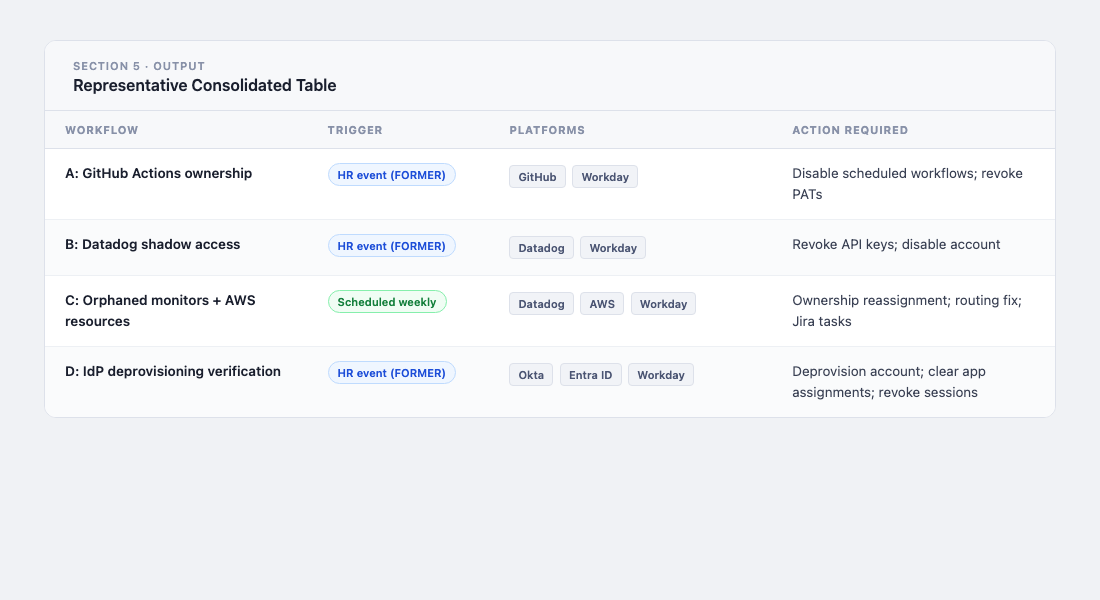
Representative consolidated table:
On check failures:
Any workflow returning ERROR for a check is flagged as UNCLEARED. A platform you cannot query is a platform you cannot clear. A former employee whose Datadog API key status returned a 500 is treated the same as one with a confirmed active key: unresolved until the check succeeds.
6. Prerequisites
| Platform | Credential | Required Scope |
|---|---|---|
| GRC platform (Vanta, etc.) | API key | people:read, integrations:read |
| Your IdP (Okta, Entra ID, etc.) | Admin token | User status, app assignments, auth log read |
| Workday | Integration System User | Get_Workers report or REST API access |
| GitHub | PAT or GitHub App | read:org, read:repo, audit_log:read (Enterprise) |
| Datadog | API + Application key | monitors_read, dashboards_read, user_access_read, audit_read |
| AWS | IAM role (cross-account) | ec2:DescribeInstances, rds:DescribeDBInstances, lambda:ListFunctions, s3:GetBucketTagging |
The pattern across all four workflows is the same: the data already exists in the platforms. Workday knows who left. GitHub knows who authored the workflow. Datadog knows who owns the monitor and who holds the API key. AWS knows what the tag says. What has been missing is the step that queries each platform, compares the result against the HR record, and surfaces the delta with a clear recommended action.
The agent is that step. It does not replace any platform and does not require new integrations. It uses the API access your GRC platform already has and adds the correlation logic that runs across all of them simultaneously.
Want to put your GRC data to work with automated security workflows? See how 543HQ builds agentic security operations.
Need a hand with this at your company?
543HQ helps startups and growing companies build security programs that actually work. Start with a free 30-minute call.
Book a Free Call