Series: AI Agents as a Security Force Multiplier. Post 8 (Capstone). Originally published on LinkedIn.
The week before your QSA arrives is not the time to find out your logging trail has a gap.
This series has covered each control family separately: network diagrams, IAM access review, encryption sweep, logging completeness, and security group exposure. Each post showed a single agent running a targeted sweep against AWS and producing a structured evidence package.
This post runs all of them at once.
One credential. One session. Six control families. The output is a unified gap report organized by severity, with control citations, affected resources, and remediation complexity for each finding. You run it one to two weeks before fieldwork. You work through what it finds. You enter the audit knowing your posture.
Here is exactly what the agent runs and what comes out.
The Prompt
The following prompt chain drives the pre-audit gap report. These were run against a Claude Code instance with read-only AWS CLI access configured. The same chain works in any harness with tool-use and multi-step reasoning: OpenClaw, Hermes, or any MCP-connected client.
The collection prompt runs six sweeps in parallel. The analysis prompt consolidates findings into a single report with severity tiers.
Prompt 1: Collect all control-family state
You have read-only AWS CLI access to all in-scope accounts and regions. Do not analyze yet. Run the following data collection sweeps in parallel and confirm when all are complete. Collect every item listed under each control family.
Network topology (PCI 1.2.3, 1.3): List VPCs, subnets, route tables, internet gateways, NAT gateways, VPC peering connections, transit gateways and attachments, VPN connections, load balancers, Elastic IPs, VPC endpoints, running EC2 instances, RDS instances, Lambda functions, and ECS clusters.
IAM and access control (PCI 7.2, 8): Generate and pull the IAM credential report. List all IAM users, groups, roles, and customer-managed policies that are currently attached. Pull each attached policy’s active version document. Pull account password policy and root MFA status from the account summary.
Encryption at rest (PCI 3.5): List all EBS volumes and snapshots owned by this account. List all RDS instances, clusters, and snapshots. List all S3 buckets and for each pull the default encryption configuration and bucket policy. List all SSM Parameter Store parameters with name and type. List all customer-managed KMS keys and pull key metadata and rotation status for each.
Logging and monitoring (PCI 10): Describe all CloudTrail trails and pull trail status and event selectors for each. List all CloudWatch log groups and metric filters. Describe all CloudWatch alarms. List SNS topic subscriptions. Check for GuardDuty detectors. Check for Config recorders and rules. Describe VPC flow logs for all in-scope VPCs.
Security group exposure (PCI 1.3): Describe all security groups and their rules. Describe all network interfaces. Pull load balancer target groups and target health. Note the PubliclyAccessible flag on all RDS instances.
Prompt 2: Analyze and generate unified gap report
Using the data you collected across all control families, produce a unified pre-audit gap report.
Organize all findings into four severity tiers: CRITICAL, HIGH, MEDIUM, and LOW/INFORMATIONAL. Use these criteria:
- CRITICAL: finding is directly exploitable or a clear PCI scope violation. Fix before audit.
- HIGH: finding creates material risk or has high remediation complexity. Remediate or document exception before fieldwork.
- MEDIUM: finding is a reportable gap but can be remediated within the audit period.
- LOW: informational, historical, or advisory. Document and acknowledge.
For each finding include: a sequential finding number, the specific PCI DSS v4.0 or SOC 2 CC control, the affected resource identifier, a one-sentence finding description, and the remediation complexity (Low/Medium/High).
After the severity tables, produce a CDE isolation confirmation table: for each CDE-tagged subnet, show whether it has a route to an internet gateway, whether outbound traffic routes via NAT, and a verdict.
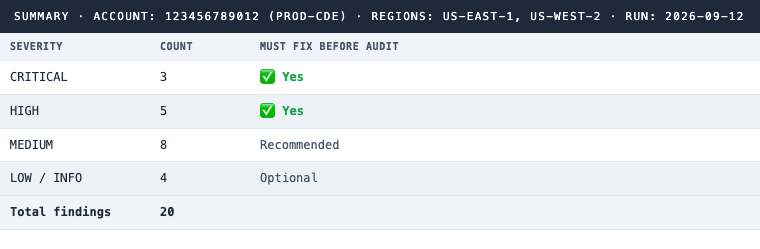
End with a summary table: finding count by severity, and whether each severity tier must be fixed before audit.
Flag any HIGH finding where remediation requires downtime or a migration (for example, enabling RDS encryption or migrating EBS volumes) as HIGH priority, because those require scheduling weeks in advance, not days.
What the Agent Runs
Across all six sweeps, the agent executes 80 to 120 AWS API calls depending on account size. AWS rate limits are permissive enough that the full collection completes in under two minutes. Here is the full command set, organized by control family.
Network topology
aws ec2 describe-vpcs
aws ec2 describe-subnets
aws ec2 describe-route-tables
aws ec2 describe-internet-gateways
aws ec2 describe-nat-gateways
aws ec2 describe-vpc-peering-connections
aws ec2 describe-transit-gateways
aws ec2 describe-transit-gateway-attachments
aws ec2 describe-vpn-connections
aws elbv2 describe-load-balancers
aws ec2 describe-addresses
aws ec2 describe-vpc-endpoints
aws ec2 describe-instances --filters "Name=instance-state-name,Values=running"
aws rds describe-db-instances
aws lambda list-functions
aws ecs list-clusters
IAM and access control
aws iam generate-credential-report
aws iam get-credential-report
aws iam list-users
aws iam list-groups
aws iam list-roles
aws iam list-policies --scope Local --only-attached
aws iam list-entities-for-policy --policy-arn arn:aws:iam::aws:policy/AdministratorAccess
aws iam get-account-password-policy
aws iam get-account-summary
Encryption at rest
aws ec2 describe-volumes
aws ec2 describe-snapshots --owner-ids self
aws ec2 get-ebs-encryption-by-default
aws rds describe-db-instances
aws rds describe-db-snapshots --owner self
aws rds describe-db-clusters
aws s3api list-buckets
aws s3api get-bucket-encryption --bucket <each-bucket>
aws s3api get-bucket-policy --bucket <each-bucket>
aws secretsmanager list-secrets
aws ssm describe-parameters
aws kms list-keys
aws kms describe-key --key-id <each-key>
aws kms get-key-rotation-status --key-id <each-key>
Logging and monitoring
aws cloudtrail describe-trails --include-shadow-trails
aws cloudtrail get-trail-status --name <each-trail>
aws cloudtrail get-event-selectors --trail-name <each-trail>
aws logs describe-log-groups
aws logs describe-metric-filters
aws cloudwatch describe-alarms
aws sns list-subscriptions-by-topic --topic-arn <each-topic>
aws guardduty list-detectors
aws guardduty get-detector --detector-id <detector-id>
aws configservice describe-configuration-recorders
aws configservice describe-config-rules
aws ec2 describe-flow-logs
Security group exposure
aws ec2 describe-security-groups
aws ec2 describe-security-group-rules --filters "Name=group-id,Values=<each-sg>"
aws ec2 describe-network-interfaces
aws elbv2 describe-target-groups
aws elbv2 describe-target-health --target-group-arn <each-tg>
aws rds describe-db-instances  # PubliclyAccessible flag
What Comes Out
The agent produces a single structured report. Every finding has a control reference, severity, affected resource, one-sentence description, and remediation complexity. Nothing is buried in a platform’s finding queue. Everything is in one place, organized by what needs attention first.
CRITICAL findings (fix before audit)
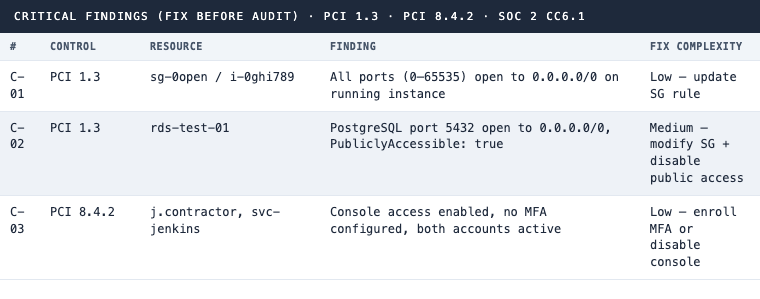
PCI 1.3 · PCI 8.4.2 · SOC 2 CC6.1
HIGH findings (remediate or document exception before fieldwork)
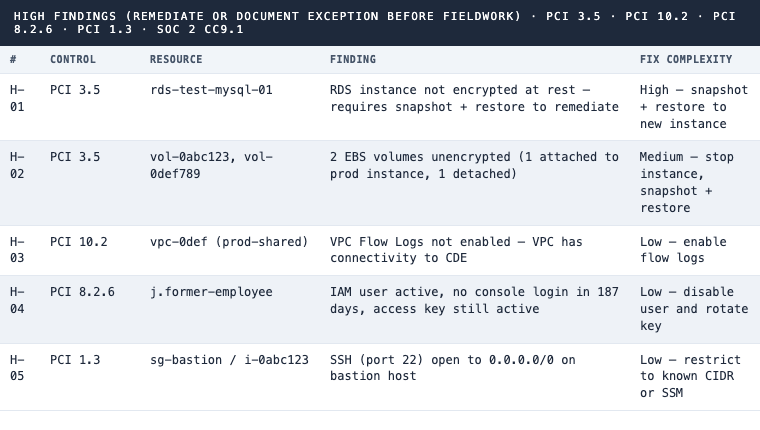
PCI 3.5 · PCI 10.2 · PCI 8.2.6 · PCI 1.3 · SOC 2 CC9.1
MEDIUM findings (remediate within audit period)
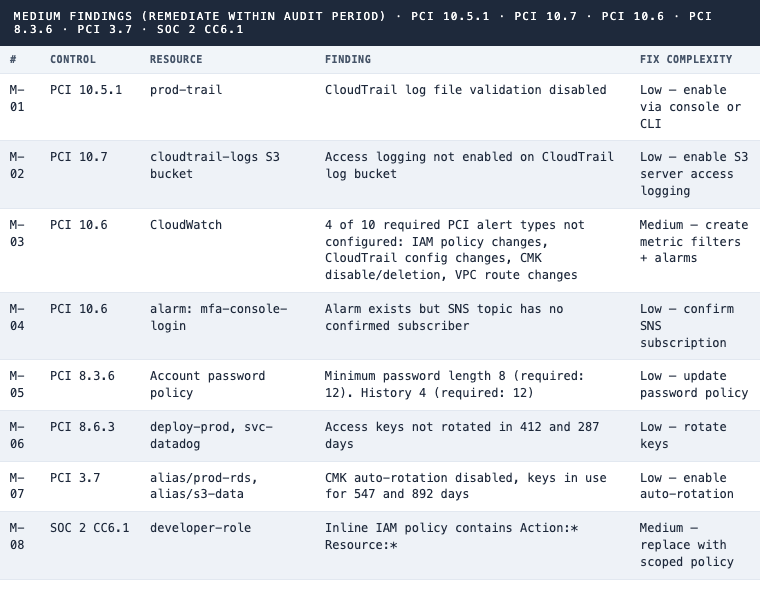
PCI 10.5.1 · PCI 10.7 · PCI 10.6 · PCI 8.3.6 · PCI 3.7 · SOC 2 CC6.1
LOW and informational findings
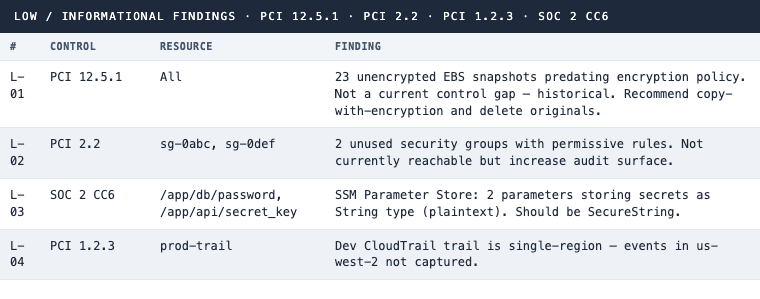
PCI 12.5.1 · PCI 2.2 · PCI 1.2.3 · SOC 2 CC6
CDE isolation confirmation

PCI 1.3 · CDE network segmentation confirmed
Summary
Why GRC Platforms Don’t Give You This
Vanta and Drata tell you that your EBS encryption default is on. They don’t query every snapshot taken before the policy was applied. They tell you that CloudTrail is enabled. They don’t check whether log file integrity validation is off, or whether the SNS topic tied to a CloudWatch alarm has an unconfirmed subscriber. They confirm that a user has MFA configured. They don’t flag the contractor account that hasn’t logged in for 187 days and still has console access.
The gaps these platforms miss are structural, not incidental. GRC platforms monitor for policy-level states: a setting is on or off, a control is enabled or disabled. What they don’t do is enumerate every resource in its actual current state and reason about what those states mean against specific PCI 4.0 requirements.
Three categories consistently appear as platform blind spots:
Historical state. Snapshots and volumes created before an encryption policy was applied remain unencrypted indefinitely. The GRC platform says encryption is on. The snapshot from 14 months ago is still plaintext.
Combination gaps. An SNS alarm exists. The topic has no confirmed subscriber. Neither fact alone triggers a platform alert, but together they mean the alarm is silent. The agent reasons about the combination; the platform monitors each property in isolation.
Inactive resources. Unused security groups, dormant IAM users, stale access keys. These aren’t violating a specific policy check, so they don’t surface as GRC alerts. They surface when an auditor asks you to demonstrate access is revoked promptly when no longer needed.
Run this sweep and you get the full picture, not just the platform’s view of the picture.
How to Use This
Run the report one to two weeks before your audit window opens. That window matters for reasons that are worth being specific about: the RDS encryption finding requires a snapshot, a restore to a new encrypted instance, and a cutover. That’s a maintenance window, and maintenance windows need scheduling. If you find that finding the day before fieldwork, you’re writing an exception, not fixing a gap.
Once you have the report, work from CRITICAL down. Everything in CRITICAL is either directly exploitable or a clear scope violation. HIGH findings that involve downtime go on the maintenance calendar immediately. For anything you’re choosing not to remediate, write the exception now: what the compensating control is, who approved it, and when it will be reviewed.
The report is also worth running monthly. Track the finding count over time. Three months of a downward trend in open HIGH findings is a data point you can bring to your CISO and your audit committee.
The Full IAM Policy
One read-only policy covers all six sweeps.
{
  "Version": "2012-10-17",
  "Statement": [
    {
      "Effect": "Allow",
      "Action": [
        "ec2:Describe*",
        "ec2:Get*",
        "elasticloadbalancing:Describe*",
        "rds:Describe*",
        "lambda:List*",
        "ecs:List*",
        "ecs:Describe*",
        "iam:GenerateCredentialReport",
        "iam:GetCredentialReport",
        "iam:List*",
        "iam:Get*",
        "s3:ListAllMyBuckets",
        "s3:GetBucketEncryption",
        "s3:GetBucketPolicy",
        "s3:GetPublicAccessBlock",
        "s3:GetBucketLogging",
        "s3:GetBucketVersioning",
        "s3:GetLifecycleConfiguration",
        "secretsmanager:ListSecrets",
        "ssm:DescribeParameters",
        "kms:ListKeys",
        "kms:DescribeKey",
        "kms:GetKeyRotationStatus",
        "cloudtrail:DescribeTrails",
        "cloudtrail:GetTrailStatus",
        "cloudtrail:GetEventSelectors",
        "cloudtrail:GetInsightSelectors",
        "logs:DescribeLogGroups",
        "logs:DescribeMetricFilters",
        "cloudwatch:DescribeAlarms",
        "sns:ListSubscriptionsByTopic",
        "guardduty:ListDetectors",
        "guardduty:GetDetector",
        "config:DescribeConfigurationRecorders",
        "config:DescribeConfigurationRecorderStatus",
        "config:DescribeConfigRules",
        "config:DescribeDeliveryChannels"
      ],
      "Resource": "*"
    }
  ]
}
Series Index
| Post | Topic | PCI Requirement | SOC 2 Criteria |
|---|---|---|---|
| 3 | Network diagrams | 1.2.3 | CC6.6 |
| 4 | IAM access review | 8.x | CC6.1, CC6.2 |
| 5 | Encryption sweep | 3.5 | CC9.1 |
| 6 | Logging completeness | 10.x | CC7.2 |
| 7 | Security group exposure | 1.3 | CC6.6 |
| 8 | Pre-audit gap report | 1.3, 3.5, 7.2, 8, 10 | All |
The pattern holds across every control family. AWS surfaces all of this data through the API. Your QSA will query the same state during fieldwork. The only question is whether you query it first.
Want a pre-audit gap assessment across your PCI DSS or SOC 2 controls before the auditor does it for you? See how 543HQ approaches compliance readiness.
Need a hand with this at your company?
543HQ helps startups and growing companies build security programs that actually work. Start with a free 30-minute call.
Book a Free Call