Series: AI Agents as a Security Force Multiplier. Post 7. Originally published on LinkedIn.
PCI DSS Requirement 1.3 asks you to restrict inbound and outbound traffic to only what is necessary for the cardholder data environment. SOC 2 CC6.6 asks you to implement controls preventing unauthorized access from external sources.
Auditors verify this the same way every time: they ask you to show them which systems are reachable from the internet and demonstrate that your CDE is not among them. If you have hundreds of security groups spread across multiple VPCs and accounts, answering that question manually takes days and produces output that’s hard to verify. A hand-drawn network diagram doesn’t answer it. A Vanta screenshot of “network controls: enabled” doesn’t answer it either.
An AI agent with AWS CLI access maps every security group rule, correlates it against actual subnet routing, and produces a precise list of which resources are internet-reachable and which are not. That list is generated from live API state. It is verifiable. Your auditor can run the same commands and get the same output.
Here is what the agent runs.
The Prompt
The following prompt chain drives the security group exposure sweep. These were run against a Claude Code instance with read-only AWS CLI access configured. The same chain works in any harness with tool-use and multi-step reasoning: OpenClaw, Hermes, or any MCP-connected client.
Prompt 1: Collect network exposure state
You have read-only AWS CLI access to the account. Do not analyze yet. Collect the following raw data and confirm when each step is complete:
- List all security groups and their inbound/outbound rules: group ID, group name, VPC, protocol, port range, source CIDR or source security group, description
- List all subnets: subnet ID, VPC ID, availability zone, CIDR block, map public IP on launch setting
- List all route tables and their associations: route table ID, VPC ID, routes (destination, target), subnet associations
- List all internet gateways and the VPCs they are attached to
- List all NAT gateways: gateway ID, VPC, subnet, state
- List all running EC2 instances: instance ID, name tag, subnet ID, VPC ID, public IP, private IP, security group IDs, state
- List all Elastic IPs: allocation ID, instance ID if associated, public IP
- List all ALBs and NLBs: name, type, scheme (internet-facing vs internal), VPC, DNS name, state. For each internet-facing LB, pull listeners and target groups with health
- List all RDS instances: identifier, publicly accessible flag, endpoint, VPC security groups, subnet group
Prompt 2: Analyze and generate evidence package
Using the data you collected, generate a structured evidence package. For each finding category, produce a table and include the relevant PCI DSS and SOC 2 control citation.
- EC2 instances directly reachable from the internet: in a public subnet with an IGW route, or with an Elastic IP attached. Include public IP, subnet type, attached security groups, and which ports are open to 0.0.0.0/0 or ::/0. (PCI 1.3.1, SOC 2 CC6.6)
- EC2 instances reachable via internet-facing load balancer: instance has no public IP and lives in a private subnet, but is a target behind an internet-facing ALB or NLB. Include the LB name and the ports exposed through it. (PCI 1.3.1, SOC 2 CC6.6)
- Security groups with 0.0.0.0/0 on administrative ports: SSH (22), RDP (3389), or database ports (1521, 3306, 5432, 27017). Flag as HIGH priority. (PCI 1.3.2, SOC 2 CC6.6)
- RDS instances with PubliclyAccessible: true. Separate into two groups: those whose security groups allow 0.0.0.0/0 (critical) and those restricted to specific sources (lower risk, but flag still warrants review). (PCI 1.3.1, SOC 2 CC6.6)
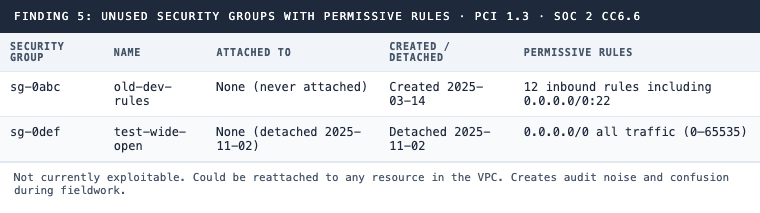
- Unused security groups not attached to any resource. These accumulate over time and create audit noise. Flag any with permissive inbound rules even if currently unattached. (PCI 1.3, SOC 2 CC6.6)
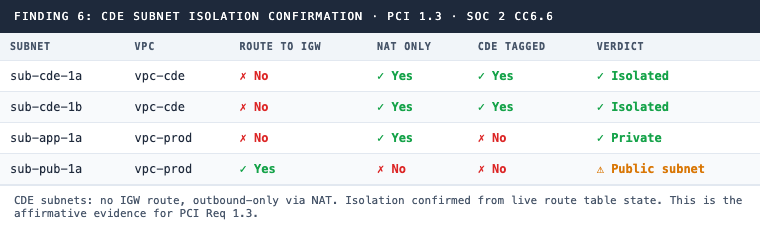
- CDE subnet isolation: for each subnet tagged as CDE, confirm whether its route table has a route to an internet gateway. Produce an affirmative table showing route to IGW status, NAT-only status, and CDE tag. This is the direct evidence for PCI Req 1.3 CDE isolation. (PCI 1.3, SOC 2 CC6.6)
Flag any security group where all traffic (0-65535, all protocols) is open to the internet as HIGH priority. For RDS with public access enabled, note that the remediation requires a DB restart when toggling PubliclyAccessible off.
What the Agent Runs
The agent executes a sequence of AWS CLI calls, reasons over the combined output, and produces a structured report. No manual pivot tables. No console screenshots that expire.
Step 1: Security groups and their rules
aws ec2 describe-security-groups --output json

aws ec2 describe-security-group-rules \
  --filters "Name=group-id,Values=<sg-id>" \
  --output json
The agent parses every inbound rule across every security group: protocol, port range, source CIDR or source security group, and description. The full picture, not just the flagged ones.
Step 2: Identify which subnets are public
A subnet is public if its route table contains a route with destination 0.0.0.0/0 pointing to an internet gateway (igw-*). The agent checks this for every subnet in the account.
aws ec2 describe-subnets --output json
aws ec2 describe-route-tables --output json
aws ec2 describe-internet-gateways --output json
This is where most manual reviews go wrong. People look at the “auto-assign public IP” flag, which is insufficient. A subnet can auto-assign public IPs and still be private if no IGW route exists. A subnet can have MapPublicIpOnLaunch: false and still be public if the route exists. The route table is the ground truth.
Step 3: Map running instances to subnets and security groups
aws ec2 describe-instances \
  --filters "Name=instance-state-name,Values=running" \
  --query 'Reservations[*].Instances[*].{
    InstanceId:InstanceId,
    SubnetId:SubnetId,
    VpcId:VpcId,
    PublicIp:PublicIpAddress,
    PrivateIp:PrivateIpAddress,
    SecurityGroups:SecurityGroups,
    Tags:Tags
  }' \
  --output json
Step 4: Elastic IPs
aws ec2 describe-addresses --output jsonAn Elastic IP attached to an instance makes it internet-reachable even if the subnet route table doesn’t have an IGW route. The agent checks both paths. A surprising number of audits find instances that got Elastic IPs attached during an incident response years earlier and were never cleaned up.
Step 5: Load balancers
aws elbv2 describe-load-balancers \
  --query 'LoadBalancers[*].{
    Name:LoadBalancerName,
    Type:Type,
    Scheme:Scheme,
    VpcId:VpcId,
    DNSName:DNSName,
    State:State.Code
  }' \
  --output json

aws elbv2 describe-listeners \
  --load-balancer-arn <alb-arn> \
  --output json

aws elbv2 describe-target-groups --output json

aws elbv2 describe-target-health \
  --target-group-arn <tg-arn> \
  --output json
The agent identifies internet-facing load balancers (those with Scheme: internet-facing) and maps which target groups and EC2 instances they route to. An instance behind a public ALB is effectively internet-reachable on whatever ports the ALB exposes, even if the instance itself has no public IP and sits in a private subnet. This is the path most people miss when doing manual reviews.
Step 6: RDS public accessibility
aws rds describe-db-instances \
  --query 'DBInstances[*].{
    ID:DBInstanceIdentifier,
    PubliclyAccessible:PubliclyAccessible,
    Endpoint:Endpoint.Address,
    VpcSGs:VpcSecurityGroups,
    SubnetGroup:DBSubnetGroup.DBSubnetGroupName
  }' \
  --output json
PubliclyAccessible: true means the instance has a public DNS endpoint. The agent flags these and then checks whether the associated security groups restrict access or allow 0.0.0.0/0 on the database port. The combination of both is the worst case.
Step 7: NAT Gateway vs IGW directionality
aws ec2 describe-nat-gateways --output jsonThe agent distinguishes outbound-only internet access (NAT Gateway, private subnet) from inbound-capable internet access (IGW, public subnet or EIP). These are different exposure profiles. For PCI scoping, a subnet that routes through NAT only is not considered internet-reachable from the network perspective. The agent captures this distinction explicitly in the CDE isolation table.
Step 8: Broad source CIDRs
The agent scans all inbound rules and flags:
- Source
0.0.0.0/0or::/0on any port - Source
0.0.0.0/0on administrative ports: 22, 3389, 1521, 5432, 3306, 27017 - Unused security groups (not attached to any network interface)
- Security groups with all-traffic rules (port range 0-65535, all protocols)
# Find unused security groups by comparing against attached network interfaces
aws ec2 describe-network-interfaces \
  --query 'NetworkInterfaces[*].Groups[*].GroupId' \
  --output json
What the Agent Produces
From all of that, the agent generates a structured evidence package.
Finding 1: Internet-reachable EC2 instances
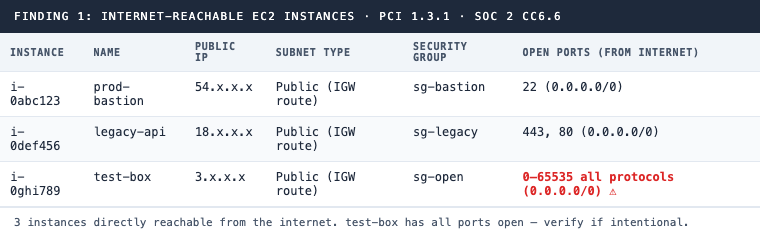
PCI 1.3.1 · SOC 2 CC6.6
Finding 2: EC2 instances reachable via internet-facing ALB
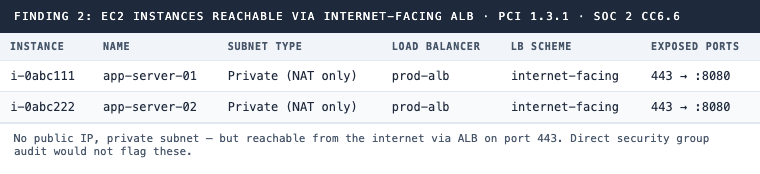
PCI 1.3.1 · SOC 2 CC6.6
Finding 3: Security groups with 0.0.0.0/0 on administrative ports
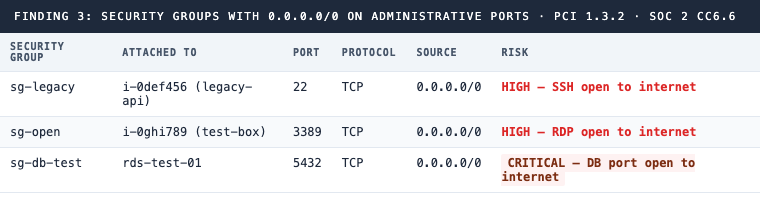
PCI 1.3.2 · SOC 2 CC6.6
Finding 4: RDS instances with public accessibility enabled
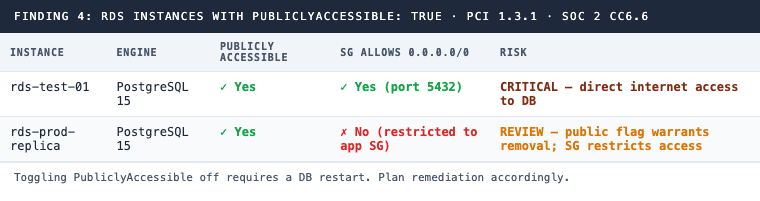
PCI 1.3.1 · SOC 2 CC6.6
Finding 5: Unused security groups with permissive rules
PCI 1.3 · SOC 2 CC6.6
Finding 6: CDE subnet isolation
PCI 1.3 · SOC 2 CC6.6
Why the CDE Isolation Table Is the Finding That Matters
Finding 6 is what your QSA actually needs.
The question is not “do you have security groups.” Everyone has security groups. The question is: can you demonstrate, from live infrastructure state, that the systems holding cardholder data are not reachable from the internet?
Every row in that table comes from actual route table associations pulled from the AWS API. The agent doesn’t infer isolation from a network diagram. It checks whether a route to an internet gateway exists for each subnet and reports the result directly.
This is the difference between telling your auditor “our CDE is in private subnets” and showing them a table generated from live AWS state where every CDE subnet has Route to IGW: No, NAT Only: Yes, and Verdict: Isolated. The second answer doesn’t require trust. It requires running the same CLI commands.
Why GRC Platforms Leave This Gap
Vanta and Drata check whether security group rules flagged as violations exist. They catch obvious things: SSH open to the world, RDP exposed, databases with 0.0.0.0/0. These are useful, but they’re the surface layer.
What they don’t do is correlate security groups against actual subnet routing to determine internet reachability. A security group that allows port 443 from 0.0.0.0/0 looks fine if the instance is in a private subnet. It’s fine. But a security group with the same rule on an instance in a public subnet with an IGW route is a direct exposure. The two configurations look similar in a security group audit. They produce completely different risk profiles.
The three gaps that come up most often in practice: instances that acquired Elastic IPs during incident response and were never cleaned up, private instances behind internet-facing ALBs that don’t appear in direct exposure checks, and RDS databases with PubliclyAccessible: true where the security group is restrictive but the flag itself is a compliance finding regardless. None of these require sophisticated misconfiguration. They accumulate through normal operational patterns over time.
The agent finds all three because it doesn’t audit security groups in isolation. It traces the full path from the internet to the resource.
The Permission Model
{
  "Version": "2012-10-17",
  "Statement": [
    {
      "Effect": "Allow",
      "Action": [
        "ec2:DescribeSecurityGroups",
        "ec2:DescribeSecurityGroupRules",
        "ec2:DescribeSubnets",
        "ec2:DescribeRouteTables",
        "ec2:DescribeInternetGateways",
        "ec2:DescribeNatGateways",
        "ec2:DescribeInstances",
        "ec2:DescribeAddresses",
        "ec2:DescribeNetworkInterfaces",
        "ec2:DescribeVpcs",
        "elasticloadbalancing:DescribeLoadBalancers",
        "elasticloadbalancing:DescribeListeners",
        "elasticloadbalancing:DescribeTargetGroups",
        "elasticloadbalancing:DescribeTargetHealth",
        "rds:DescribeDBInstances"
      ],
      "Resource": "*"
    }
  ]
}
Read-only. No write permissions. The agent observes; it does not modify.
What’s Next in This Series
The final post combines all of these checks: network diagram, IAM access review, encryption state, logging completeness, and security group exposure, into a single pre-audit gap report that runs on demand.
Each check has been a standalone sweep. The combined report is what you run the week before your QSA arrives.
Working toward PCI DSS compliance and need to demonstrate CDE isolation? See how 543HQ builds network segmentation controls and audit evidence.
Need a hand with this at your company?
543HQ helps startups and growing companies build security programs that actually work. Start with a free 30-minute call.
Book a Free Call